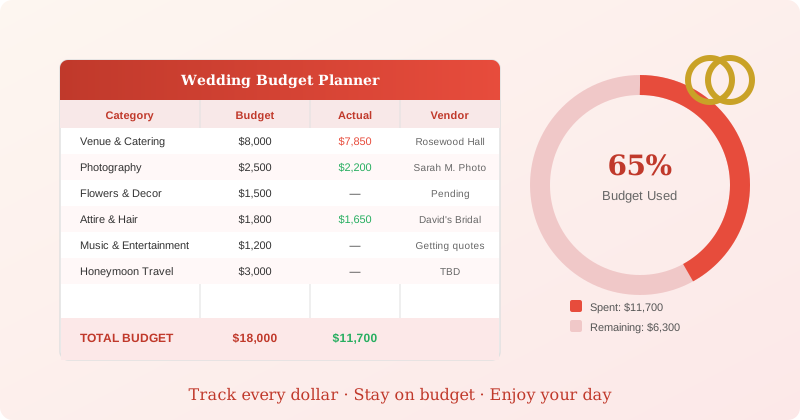
Wedding Budget Spreadsheet: Track Every Dollar Before You Say I Do
Most couples start wedding planning with a rough number in their heads. Then the quotes arrive, the deposit requests pile up, and within three months there's no clear picture of where the money actually went.
A wedding budget spreadsheet solves this. Not by cutting your dreams — by making the tradeoffs visible so you can decide what matters most.
Why a Dedicated Wedding Spreadsheet Beats Generic Budgeting
Your regular monthly budget wasn't designed for a wedding. Wedding budgeting has some unique characteristics:
Lumpy, irregular payments. You're not paying $200/month for photography — you're paying a $500 deposit in March, then the balance of $1,800 six months later. Tracking this in a monthly budget creates confusion.
Multiple vendor relationships. You're managing 10–15 vendors simultaneously, each with their own contract terms, payment schedules, and cancellation policies.
Guest count multipliers. Many costs scale with headcount. If you add 20 guests late, you need to see the downstream effect on catering, invitations, and seating immediately.
Comparison shopping across quotes. When you get three photography quotes, you want to compare them side-by-side against your budget, not hunt through emails.
A purpose-built wedding budget spreadsheet handles all of this in ways a general budget cannot.
The Core Categories to Track
A complete wedding budget spreadsheet needs these categories at minimum:
Venue and catering (typically 35–45% of total budget)
- Venue rental fee
- Catering per-person cost × guest count
- Bar service (if not included)
- Staffing / service fees
Photography and videography (typically 10–15%)
- Photographer + associate/second shooter
- Videographer (optional)
- Albums, prints, digital gallery
Flowers and decor (typically 8–12%)
- Bridal party florals (bouquets, boutonnieres)
- Ceremony arrangements
- Reception centerpieces
- Lighting / additional decor rentals
Attire and beauty (typically 8–12%)
- Wedding dress + alterations
- Groom's attire
- Hair and makeup (for wedding party too?)
- Jewelry and accessories
Music and entertainment (typically 5–8%)
- Band or DJ
- Ceremony musician
- Sound system rental
Transportation (typically 3–5%)
- Bridal party transportation
- Guest shuttles (if needed)
Paper goods and stationery (typically 2–3%)
- Save-the-dates
- Invitations + envelopes + postage
- Day-of programs
Additional costs often overlooked:
- Officiant fee
- Wedding cake or desserts
- Rehearsal dinner
- Honeymoon travel
- Rings (separate from engagement ring)
- Tips for vendors
- Contingency / buffer (budget 5–8% of total)
The buffer is not optional. Something always costs more than expected.
How to Structure Your Wedding Budget Spreadsheet
A well-structured spreadsheet has three views working together:
1. Master Budget Overview
One row per category, showing:
- Budgeted amount — what you planned to spend
- Committed amount — what's under contract (even if not paid yet)
- Paid to date — actual cash out the door
- Remaining — what you still owe
- Variance — over or under budget
This overview tells you at a glance whether you're on track. If venue is 15% over budget, you need to find savings somewhere else.
2. Vendor Payment Schedule
One tab tracking every payment milestone:
- Vendor name
- Total contract amount
- Each payment due date and amount
- Whether payment is due by check, card, or transfer
This is your cash flow calendar. Knowing that $3,200 is due in October and $4,500 in November lets you time savings deposits correctly.
3. Per-Category Quote Comparison
For major vendors (venue, photography, catering, florist), one tab per category to compare 3 quotes side-by-side.
Most couples skip this and just take the first quote that feels right. Structured comparison often reveals a $500–$1,000 difference for comparable services.
Want more budgeting guides? Get guides like this in your inbox — Frugal Rise delivers one free deep-dive every week.
Free Wedding Budget Spreadsheet Options
Google Sheets "Wedding Budget" Template
Google Sheets has a built-in wedding budget template. In Google Sheets, go to File → New → From template gallery and search "wedding."
It covers the basic categories with a simple layout — useful for getting started in under five minutes. The main limitation is that it doesn't handle vendor payment scheduling or quote comparisons.
Best for: Couples who need something today and will customize it as they go.
Vertex42 Wedding Budget Template
Vertex42 offers a free Excel wedding budget template designed for more detailed tracking. It includes a category breakdown and some totaling formulas.
Search "Vertex42 wedding budget template" for the free download. It's more complete than the Google template, though still lacks a payment schedule tracker.
Best for: Excel users who want a more structured starting point.
Zola's Free Wedding Budget Tool
Zola (the wedding planning platform) offers a free online budget tracker at zola.com/wedding-planning/budget. It integrates with their vendor marketplace, which is useful if you're using Zola for other planning.
The limitation: it's tied to their platform, so your data lives in their system, and the categories are somewhat locked.
Best for: Couples already using Zola for RSVPs, registry, or vendor search.
When a Paid Template Makes Sense
Free templates are enough for a simple wedding. But if you're managing a larger guest list, multiple vendors, and a budget over $15,000, the gaps in free templates start to matter.
Our Wedding Budget Planner ($9.99) was built specifically around how weddings actually work — not just as a budget, but as a project management tool for one of the most complex multi-vendor events most people will ever plan.
What's included:
Master Budget Dashboard — Color-coded overview with budget vs. actual vs. committed columns. Shows your overall financial picture with a visual spending gauge so you can see at a glance if you're on track.
Vendor Management Tab — One row per vendor with contract amount, payment schedule, contact info, and notes. Every deposit deadline and payment due date in one place.
Payment Calendar — Monthly view of every payment coming due. No more missed deadlines or scrambling for cash.
Quote Comparison Sheets — Side-by-side comparison for photography, catering, florals, and venues. Rate quotes against each other with automatic scoring.
Guest List Cost Calculator — Adjust your headcount and see the immediate impact on catering, invitations, and total budget. Useful when you're deciding whether to trim the guest list.
Works in Excel and Google Sheets — No app download required. Your data stays with you.
The spreadsheet is designed to work from the first venue inquiry through the final vendor tip on the day itself.
When to Set Up Your Wedding Budget Spreadsheet
The most common mistake is waiting until after you've booked one or two vendors. By then you've already committed budget without a full picture.
Set up your spreadsheet before your first paid deposit. Ideally, before you've even toured venues. That means:
- Set the total number — not a range, a specific number. "Between $15,000 and $25,000" is not a budget. Pick a number and work from it.
- Fill in the categories with rough allocations — use the percentages in this article as a starting point
- Start collecting quotes into the comparison tabs
- Log your first deposit the day you write the check
From that point on, update the spreadsheet every time money moves. Ten minutes after signing a contract. The day the invoice arrives. The morning you pay the final balance.
Wedding planning takes 12–18 months for most couples. A spreadsheet you maintain consistently over that time becomes a complete financial record of one of the most significant purchases of your life.
A Note on the Buffer
Budget 5–8% of your total as a contingency. On a $20,000 wedding, that's $1,000–$1,600 sitting in your spreadsheet as "buffer."
You will use it. Invitations cost more than expected. The venue charges a cleaning fee that wasn't clear in the initial quote. You add six guests at the last minute. The DJ needs an extra cable run.
If you don't use the buffer, you've had a remarkably smooth planning process. But planning without one is how couples end up in debt after a wedding they thought they'd budgeted carefully.
Getting Started
Pick your tool — free Google Sheets template or the more complete paid planner — and fill in your total budget number and the category breakdowns before you take another planning step.
The point isn't the spreadsheet itself. It's having a clear picture of where you are at every point in the planning process, so that every decision is made with full information.
Planning a wedding involves a lot more than the budget. For broader financial advice for couples, explore budgeting as a couple and our guide to planning your finances before a major life event.